


is there any information about that super trap spy on Dhaal in outside the farrow facility. Fighting them is a pain they just wont die even at zero hp and high lust.


I would suggest checking the Busts page first and see if the image isn't already uploaded--or if the image is out of date, you can go to the image's page and upload a new image for it.How do I add/upload images to a character's wiki page?
Yeah my first reflex was to check the Edit on existing and complete pages that already had what I would be looking for in the syntax!If you need examples, you can go to an existing page, Edit it (but don't save any edits you make), and look at how it is set up. Some pages use a tabbed format to allow multiple variants and some just use a simple link. Use your best judgement and choose what works best for the page. Also update any extra captions or any related info to the image where possible.
That's good to know that I can preview my work, thank you so much for the in depth breakdown for me <3Also remember to preview your changes to make sure nothing broke before you save any changes.
If something is off, I or another contributor may do a quality control pass. I know I'm not super active with changes or updates, but if there is a need for it and I can spare the time, I don't mind correcting things for consistency.
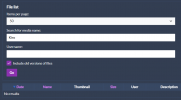
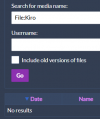
Hm, if that's not working for you, try typing "File:Kiro" (or any combination of "File:" and whatever file name you want to find) in the main search bar on the top right corner of the page. Hopefully that helps.Alright so I think an issue is that the Search function for the list of Files doesn't work intuitively? Like it doesn't show any files that have, at minimum, the search string within the name (Unless I'm not doing something specific, I've tried with the old versions box checked and unchecked)
Alright, the main search bar works as expected. "File:Kiro" will show everything that has that and anything that has a space after itHm, if that's not working for you, try typing "File:Kiro" (or any combination of "File:" and whatever file name you want to find) in the main search bar on the top right corner of the page. Hopefully that helps.

At the same time, though the fact each attempt increments a flag that counts guarantees you'll get it eventually.Is it 7 points collectively or at once with Of Use? The article for the Actuator doesn't say.


Likely out of datewiki says that Gold Myr Deserter and Red Myr Deserter don't give credits but instead give 200 exp,
but both of them give credits and a lot of exp.
Is wiki info wrong? or patched?
View attachment 42084

i did not check the actual range of credits they can drop, but it is now fixed.wiki says that Gold Myr Deserter and Red Myr Deserter don't give credits but instead give 200 exp,
but both of them give credits and a lot of exp.
Is wiki info wrong? or patched?
View attachment 42084
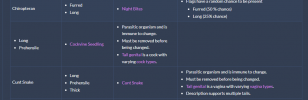
this is fixed as wellWas browsing through the wiki without a clear goal in sight. Found two similar errors in two text boxes of two different pages. First one is in the Cerespirin page, second one is on the Tails page, in the "Types" section

Riiiiiiiiiiiiiiiight... keep trying for that social credit pal. I'm sure you'll get it one day.Hello! I’m a player from China. tits has been growing increasingly popular among Chinese players, especially in communities dedicated to Fenoxo and the team’s work. Many players are eager to have a Chinese-language version of the wiki.
Would it be possible to give our localization team an editor account so that we can translate the wiki ourselves? If possible, we would also appreciate having a language-switching option on the wiki, allowing users to switch between English and Chinese.
If granting editing access or adding multilingual support is not feasible, could you provide us with a copy of the wiki’s source code or database? We could then translate it and host a separate Chinese version ourselves.
We would be happy to handle the translation and ongoing maintenance. Thank you for considering our request!

