


Windows 11. I'm using steam version 0.9.12
This issue occurs exclusively when a Discord voice call is active and the Discord Voice Overlay (the in-game overlay displaying user names/avatars on the side) is enabled.
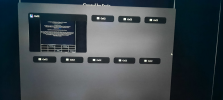
It does not require toggling the full overlay menu via hotkey; simply being in an active voice call with the voice widget visible on-screen triggers the bug. Every time Alt + Tab is pressed while the game is running alongside the voice overlay, an additional empty/ghost "CoC2" window entry appears in the Windows task switcher, accumulating more duplicates with each switch. The game functions normally with zero ghost windows when Discord or its overlay is not running.
No console errors detected
This issue occurs exclusively when a Discord voice call is active and the Discord Voice Overlay (the in-game overlay displaying user names/avatars on the side) is enabled.
It does not require toggling the full overlay menu via hotkey; simply being in an active voice call with the voice widget visible on-screen triggers the bug. Every time Alt + Tab is pressed while the game is running alongside the voice overlay, an additional empty/ghost "CoC2" window entry appears in the Windows task switcher, accumulating more duplicates with each switch. The game functions normally with zero ghost windows when Discord or its overlay is not running.
No console errors detected
Attachments
-
 a.png1,022.6 KB · Views: 2