


1. Download and Install Firefox from the Apple AppStore
2. Open Firefox and clear the cache
3. Visit https://www.fenoxo.com/play/TiTS/release/
4. Click the check for updates pop up (both options have the same result)
I am unable to copy/paste the text from the webpage.
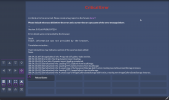
Above the “Reload Game” button, I am able to scroll slightly to reveal the following text before it snaps back:
“(08:54:23:707) (Serialization) info: Persistent storage status: false”
2. Open Firefox and clear the cache
3. Visit https://www.fenoxo.com/play/TiTS/release/
4. Click the check for updates pop up (both options have the same result)
I am unable to copy/paste the text from the webpage.
Above the “Reload Game” button, I am able to scroll slightly to reveal the following text before it snaps back:
“(08:54:23:707) (Serialization) info: Persistent storage status: false”