


Good day,
I always play CoC2 through the Firefox browser, but I am losing all my saves (and auto-saves) after the recent updates. Unfortunately I didn't had a backup save and thus I decided to start over.
Losing save files happens all the time when I reopen Firefox. Upon launch, the "Theme" setting also shows the Light theme when I have set it on 'Dark'.
I disabled my browser extension, but that didn't fix the problems I'm experiencing.
Safari works fine - so I'll be using that for now.
Hopefully there is a fix as FireFox is my preferred browser.
Keep up the great work, I really enjoy playing CoC2.
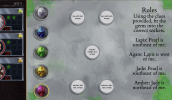
edit: I had issues with Gem puzzle on Firefox, but after experimenting I figured out it had to do with "Visually impaired Mode". That was turned on after an update, and that broke the gem puzzle within the Old Forest. I was unable to insert certain gems in some slots of the puzzle.
I always play CoC2 through the Firefox browser, but I am losing all my saves (and auto-saves) after the recent updates. Unfortunately I didn't had a backup save and thus I decided to start over.
Losing save files happens all the time when I reopen Firefox. Upon launch, the "Theme" setting also shows the Light theme when I have set it on 'Dark'.
I disabled my browser extension, but that didn't fix the problems I'm experiencing.
Safari works fine - so I'll be using that for now.
Hopefully there is a fix as FireFox is my preferred browser.
Keep up the great work, I really enjoy playing CoC2.
edit: I had issues with Gem puzzle on Firefox, but after experimenting I figured out it had to do with "Visually impaired Mode". That was turned on after an update, and that broke the gem puzzle within the Old Forest. I was unable to insert certain gems in some slots of the puzzle.
Attachments
-
 Schermafbeelding 2026-01-26 om 13.38.37.png3.9 MB · Views: 11
Last edited: